A driver app for haulage jobs, checks and PODs.
HauliK Driver gives haulage drivers one mobile place for assigned jobs, ordered stops, daily walkaround checks, defect reports, status updates and delivery evidence. Each submitted record returns to the office dashboard in context. The same connected workflow is available in the HauliK Driver app for iOS and Android.
The driver app records work as it happens. It does not provide live driver tracking, telematics or live vehicle tracking.
What drivers can do from the app
Replace WhatsApp threads, paper sheets and camera-roll photos with one mobile workflow that keeps every update attached to the right job.
Assigned jobs in the driver app
Drivers open the app to see the work assigned to them, with collection and delivery details, scheduled times, customer references and any operational notes added by the office.
See how dispatch assigns workJob progress updates
Drivers move a job through its stages from the app, so the office can follow progress against the job record instead of chasing phone calls and messages.
Collections, deliveries and multi-stop work
Simple Fast Jobs and multi-stop Journeys both reach the driver app, with each collection and delivery stop shown in sequence with its own details.
Digital walkaround checks
Drivers complete configurable daily walkaround checks in the app before work, with location evidence where available and optional photos where provided.
Explore walkaround checksDefect reporting with notes and photos
Failed check items can create defects with notes and severity for authorised office review, while an optional photo can support the completed check.
See defect reportingPOD evidence, signatures and photos
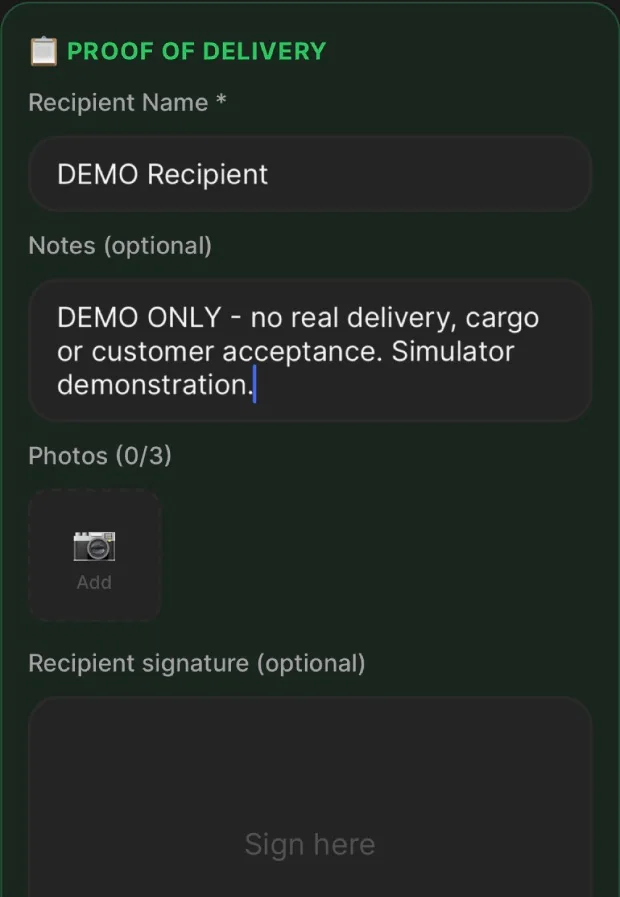
At delivery, drivers can capture status, recipient details, signatures and photos where required, keeping proof of delivery linked to the right job and stop.
See proof of deliveryOffice visibility through the web dashboard
Updates from the driver app appear against the job in the office web dashboard, so transport teams can review activity, checks and evidence as work continues.
See the office dashboardMessages between drivers and the office
In-app driver and dispatcher messaging keeps work-related conversations attached to the operation, instead of spread across personal chat apps.
From office assignment to retained evidence
The office assigns the work in the web dashboard. The driver app carries it on the road. HauliK keeps each update with the job so office teams can review it.
- 01
Office assigns the work
The transport office creates the job and assigns the driver, vehicle and trailer in the web dashboard.
- 02
Driver picks it up on mobile
The assigned job, stops and instructions appear in the driver app on the driver’s phone.
- 03
Driver works the job
Checks, status updates, defect notes, messages and delivery evidence are all captured from the same app.
- 04
Office keeps the record
Each update stays linked to the job, so office users can review history, checks and POD evidence later.
Why scattered messages and paper sheets cause problems
Personal chat apps, paper check sheets and photos saved to a camera roll can each hold part of the story. The difficulty is proving which message, sheet or image belongs to which driver, job, stop or delivery, then finding it again weeks later.
Updates stay with the job
Status changes, checks and notes are attached to the job record, not lost in a chat thread.
Evidence stays findable
POD, signatures, photos and defect notes are captured in context instead of in a personal photo library.
Drivers carry one tool
Jobs, checks, defects, messages and delivery evidence all live in a single mobile app.
What the driver app includes by plan
HauliK is priced per vehicle. Driver capabilities are introduced by plan, with full access available during the 14-day trial.
Checks and defects on mobile
Digital walkaround checks, coupling and load-security checks and defect reporting are available to drivers on every plan, including during the 14-day trial.
Jobs, updates, POD and messaging
Assigned jobs, job status updates, proof of delivery capture and driver to dispatcher messaging are included from the Fleet plan upwards.
Where features are available
Some actions depend on driver permissions, the assigned work and device features such as the camera. Location evidence is recorded where available, and is not attached to every action.
One connected driver workflow
Drivers can manage assigned jobs, complete checks, record stop progress and capture per-stop proof of delivery in the HauliK Driver app.
Start a walkaround from the Checks tab
Drivers can start a vehicle or trailer walkaround directly from Checks, even when no job is currently allocated. The same screen lists recent submitted checks and provides entry points for fuel logs, defect reports and incident reports.
See the HGV walkaround check app workflow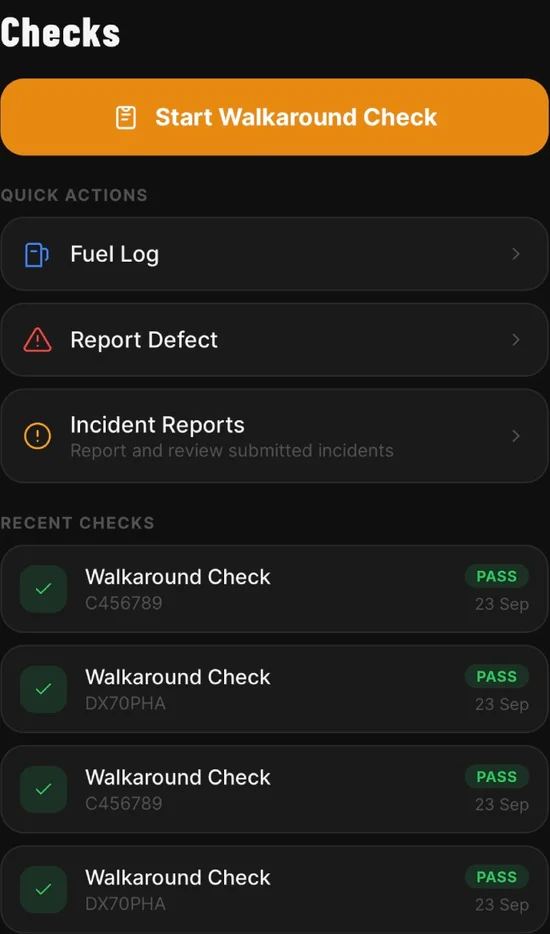
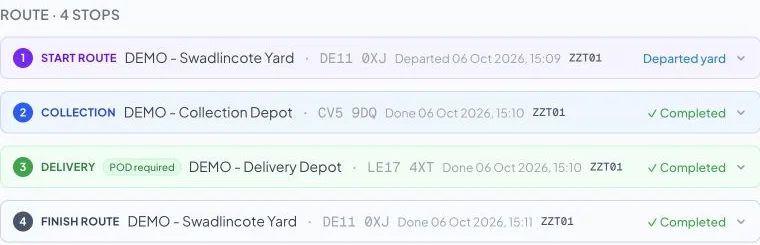
A complete run: yard, collection, delivery, yard
Follow one demonstration job through the driver app, from confirming the truck and trailer to checks, collection, proof of delivery and the return to base.
Captured from a local iOS development build using a test account and test assets. Automatic job-linked check prompts shown here are a test flow, with availability depending on the app version and account. This demonstration does not establish a universal departure block or guarantee that checks cannot be missed. The driver remains responsible for inspecting the vehicle and trailer.
STEP 01
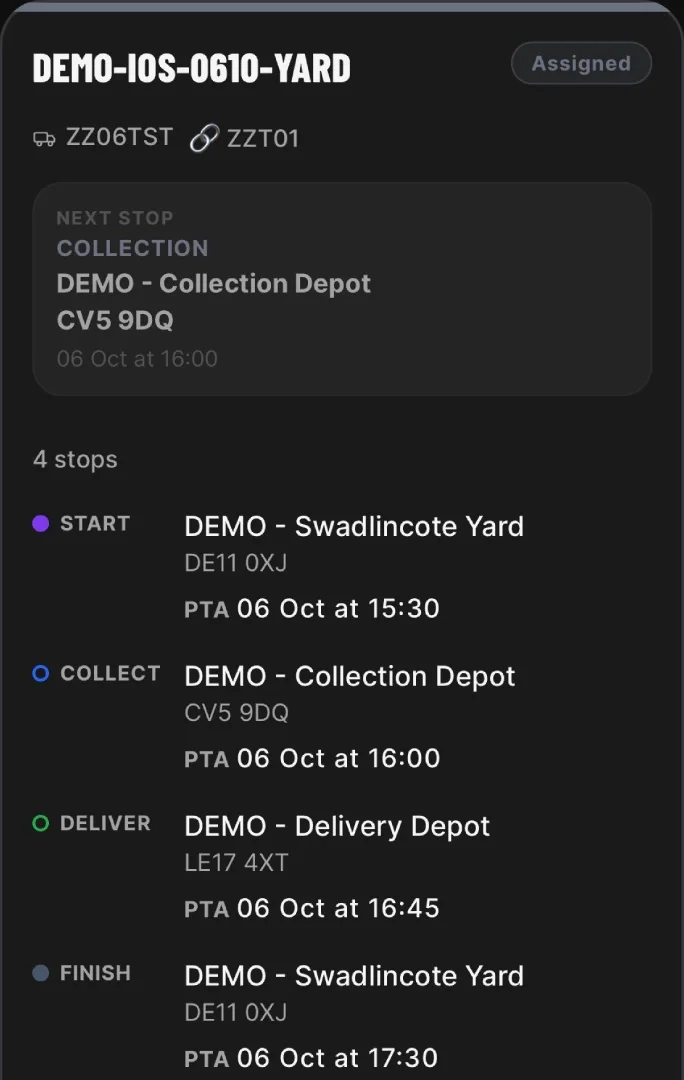
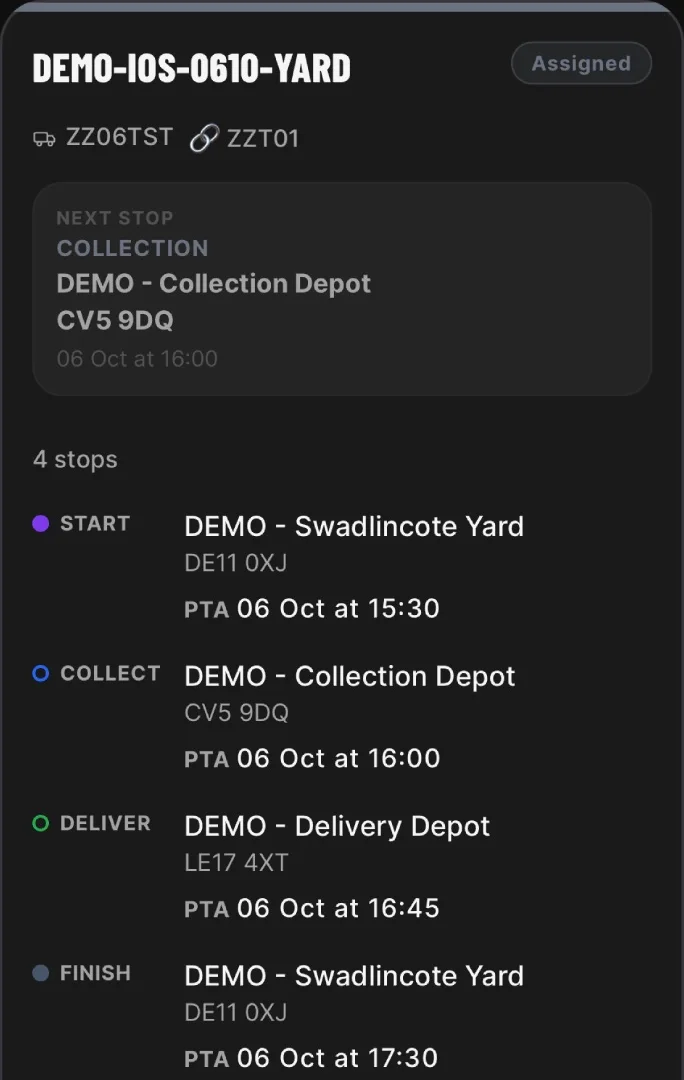
Receive the whole run
The assigned job shows the starting yard, collection, delivery and return yard in order.
STEP 02
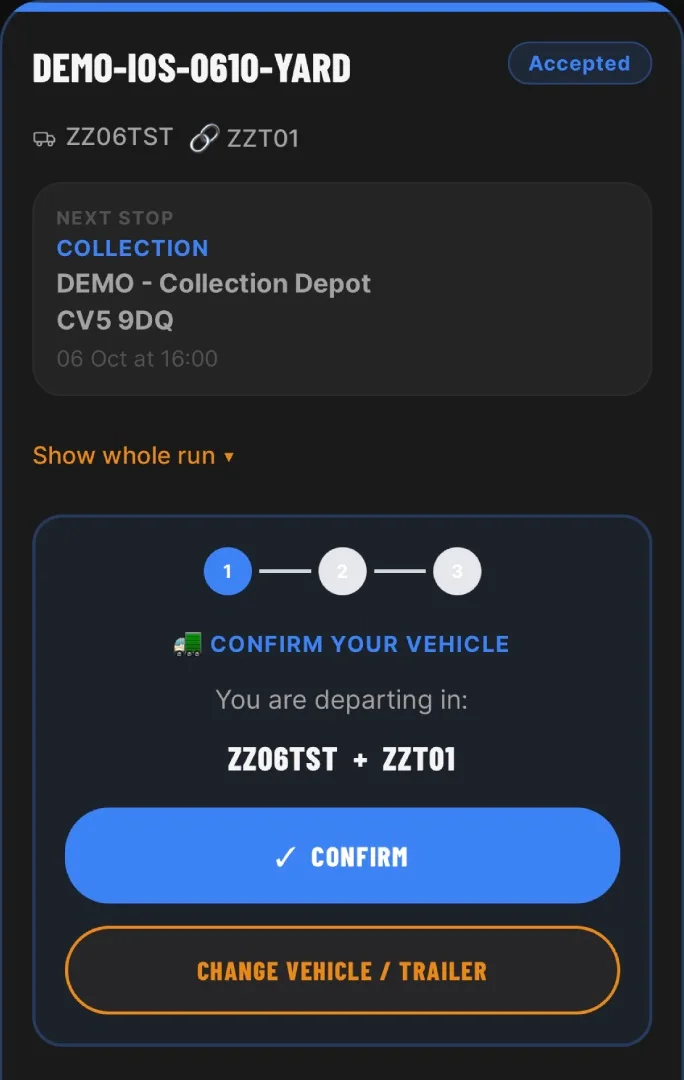
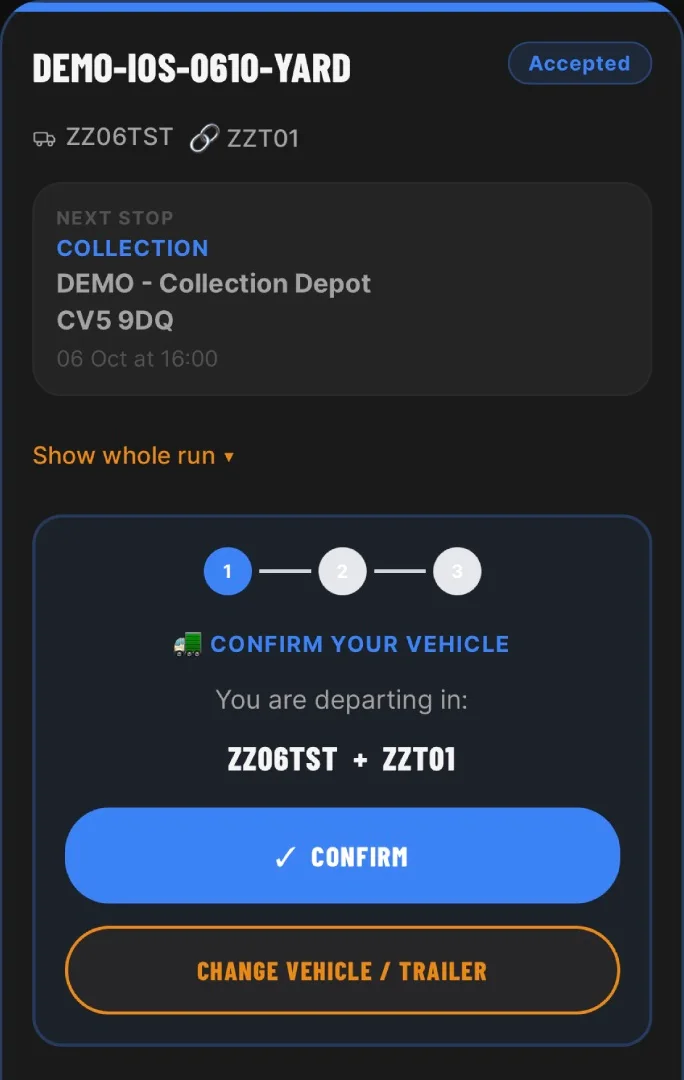
Confirm the truck and trailer
The driver confirms the vehicle and trailer combination before leaving the yard.
STEP 03
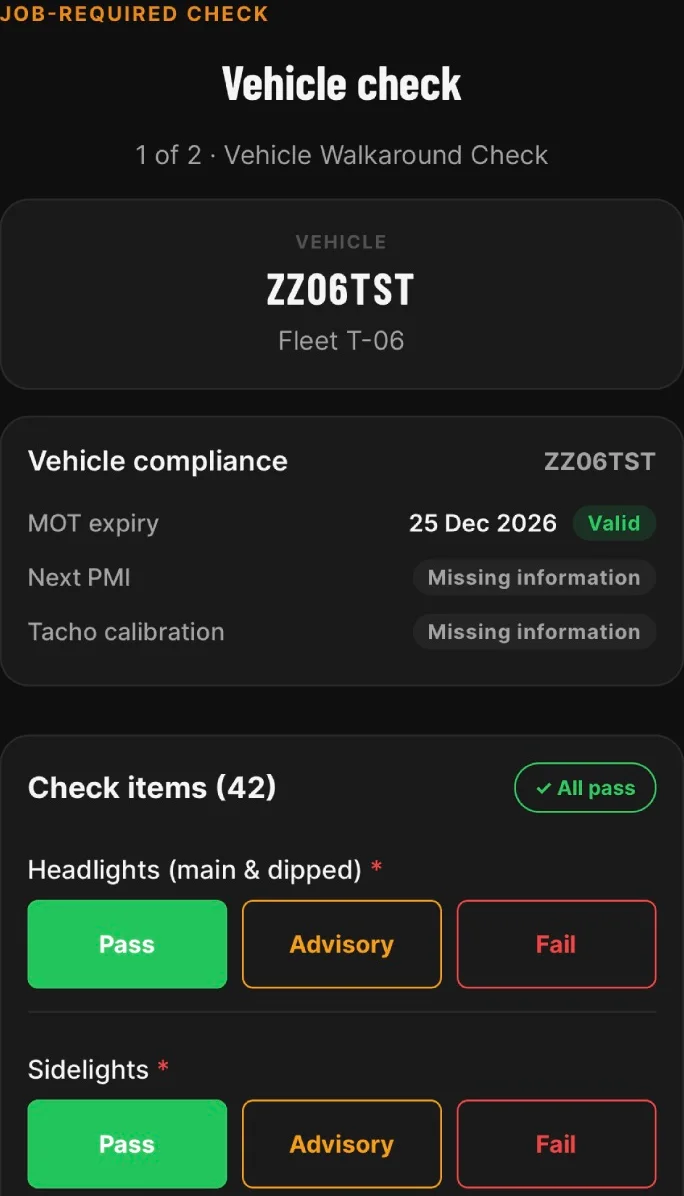
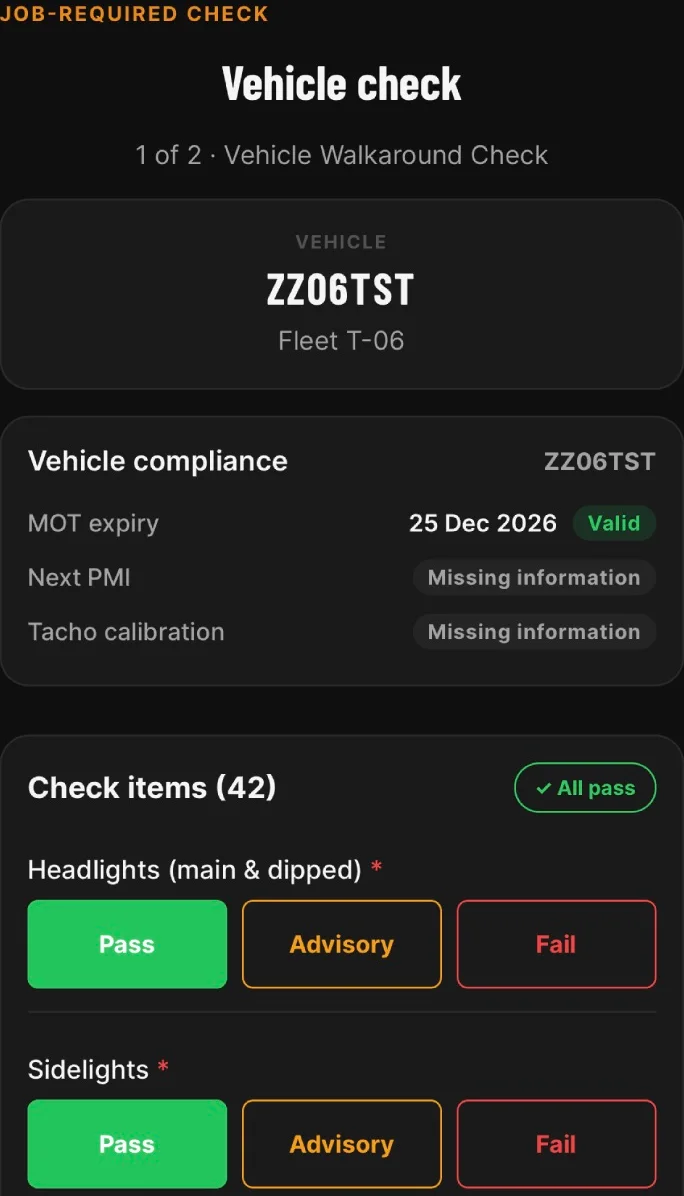
Answer the vehicle check
In this test flow, confirming the assets automatically opens the check for the assigned truck: check 1 of 2.
STEP 04
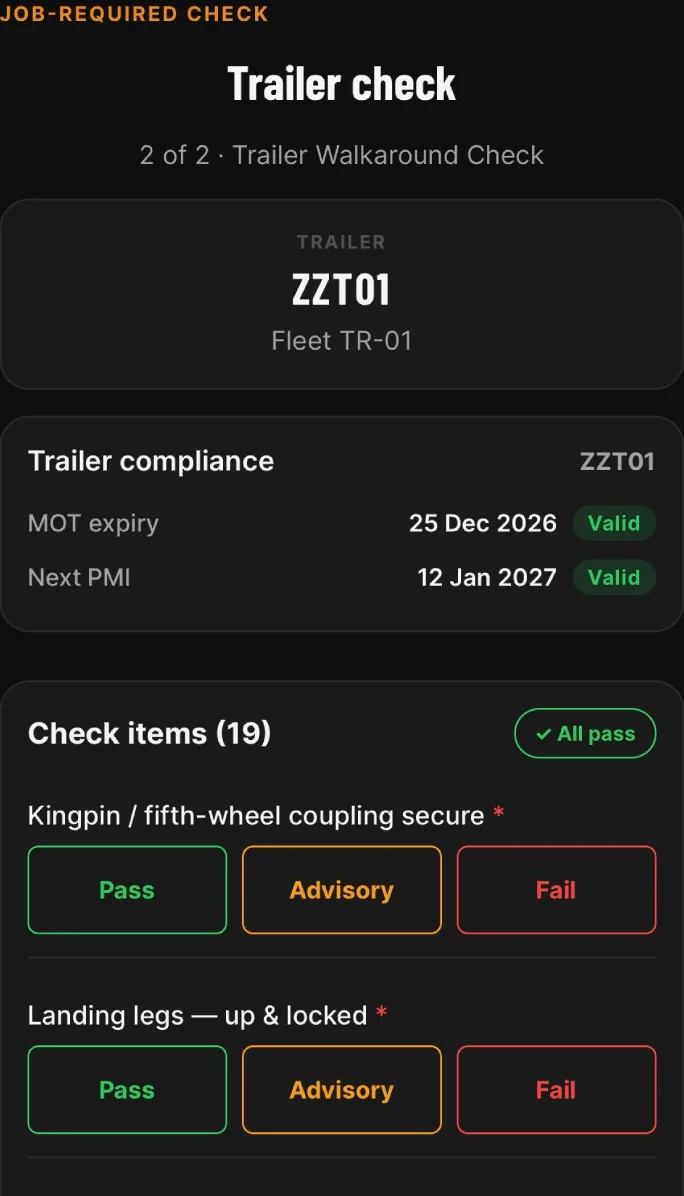
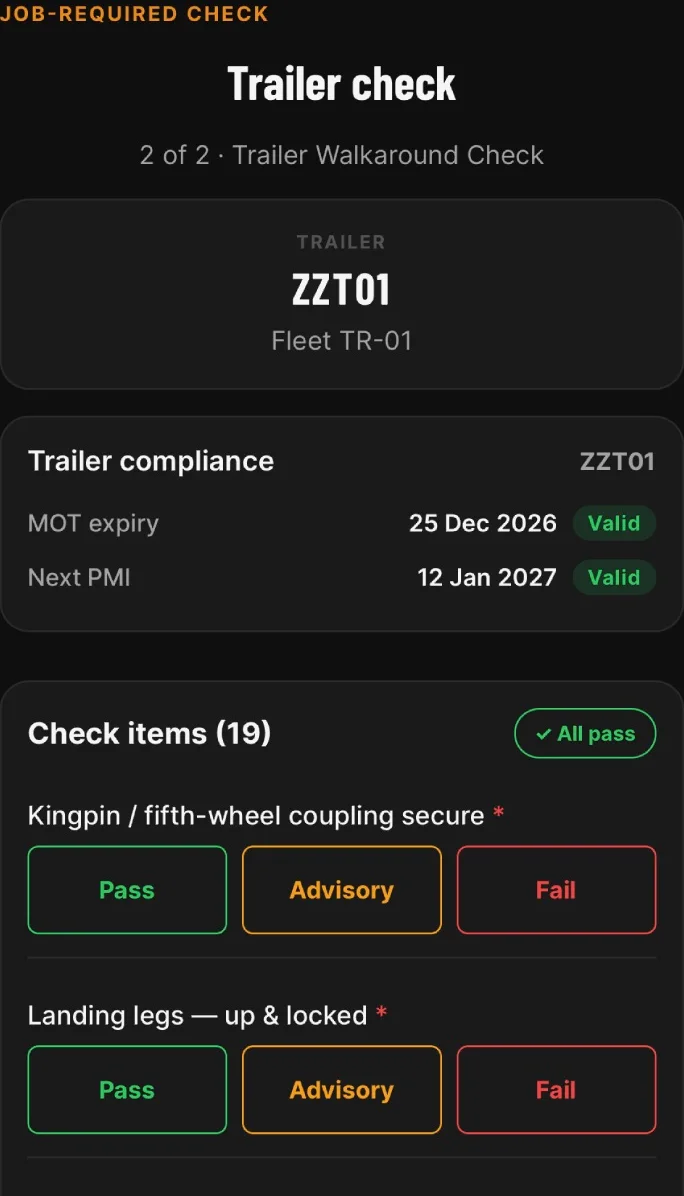
Check the assigned trailer
The next form is for the assigned trailer: check 2 of 2, including coupling, airlines and lights.
STEP 05
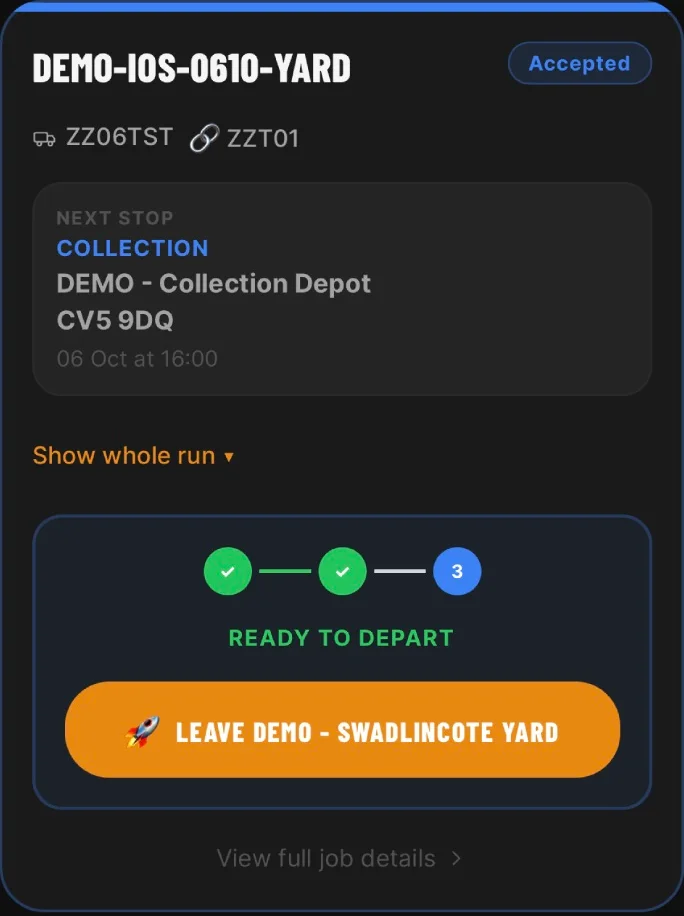
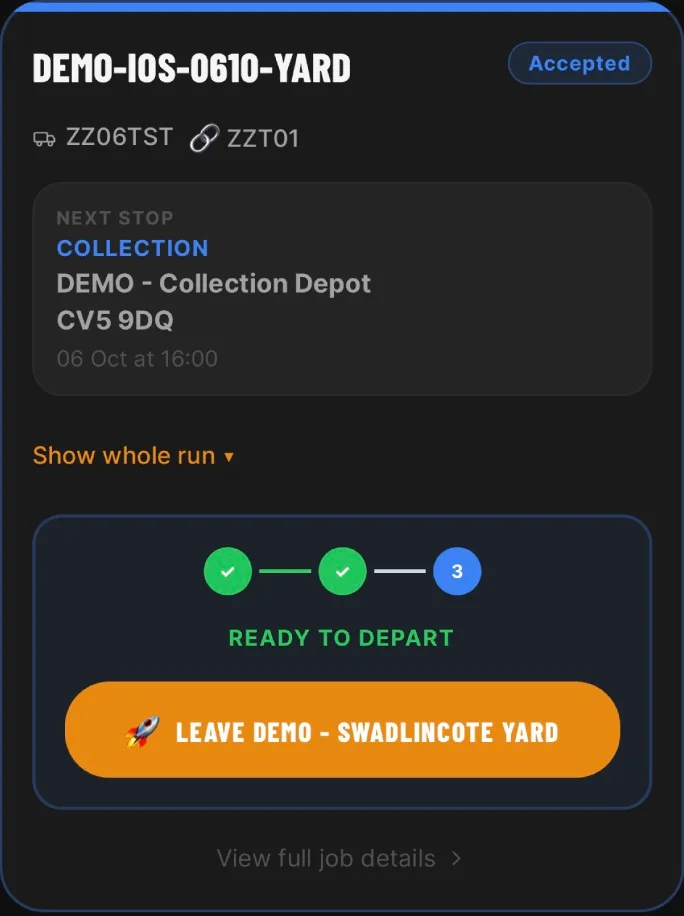
Record checks before departure
After both test checks are recorded, the job screen shows Ready to depart and the action to leave the yard.
STEP 06
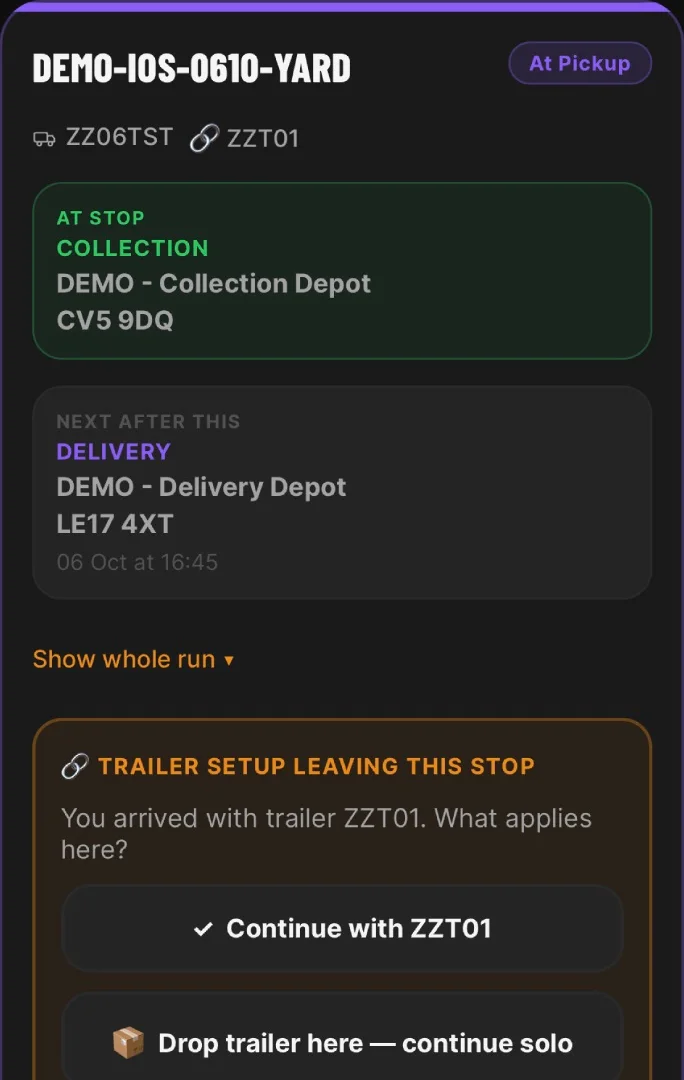
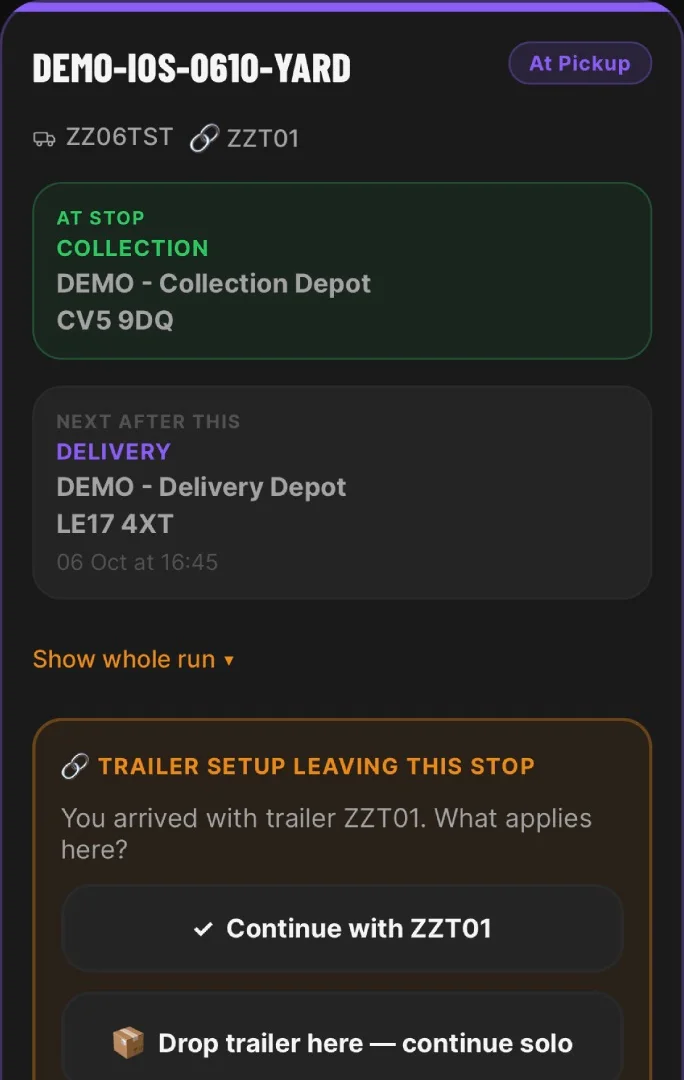
Confirm the collection setup
At collection, the app asks whether the driver keeps, drops or changes the trailer. This example continues with ZZT01.
STEP 07
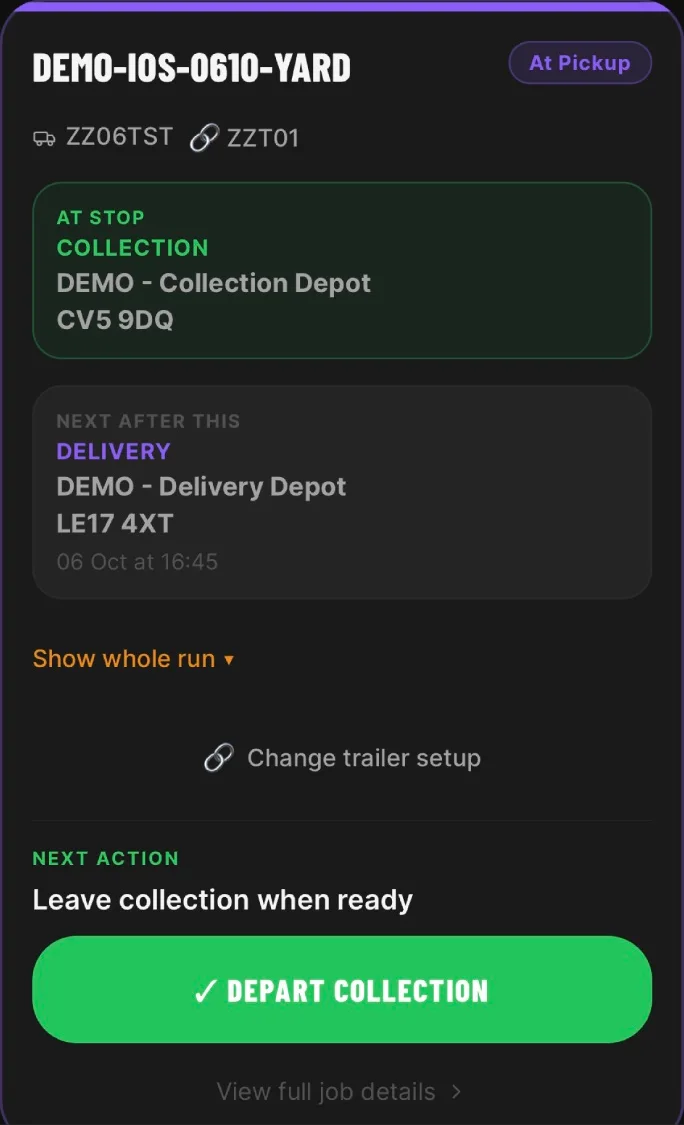
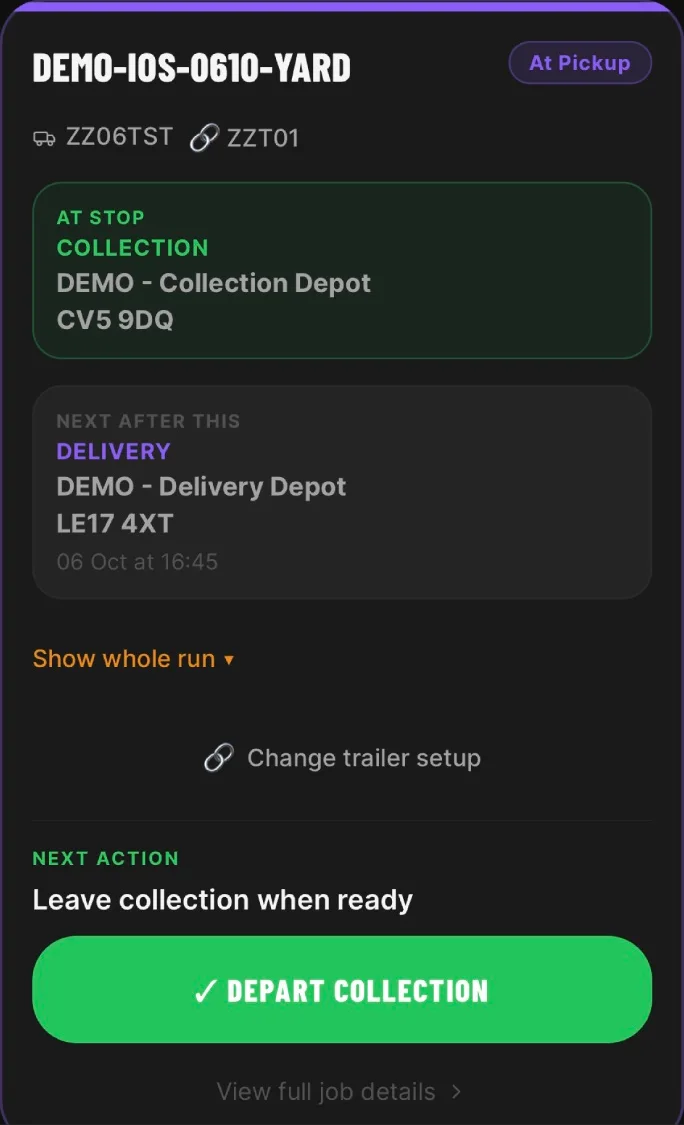
Leave collection when ready
The driver records departure from collection. The next stop becomes the delivery depot.
STEP 08
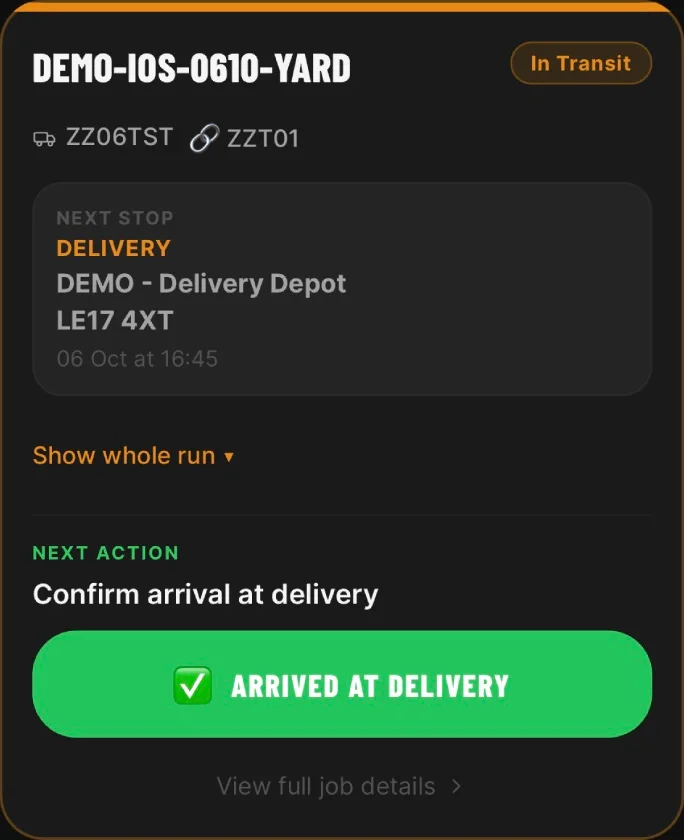
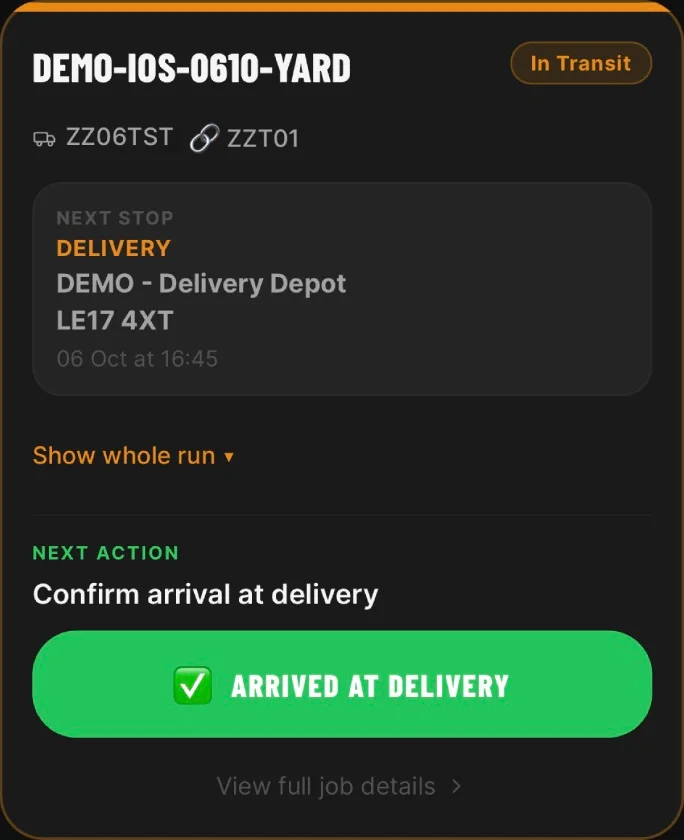
Record arrival at delivery
The next action confirms arrival at the delivery stop, keeping the update with the job.
STEP 09
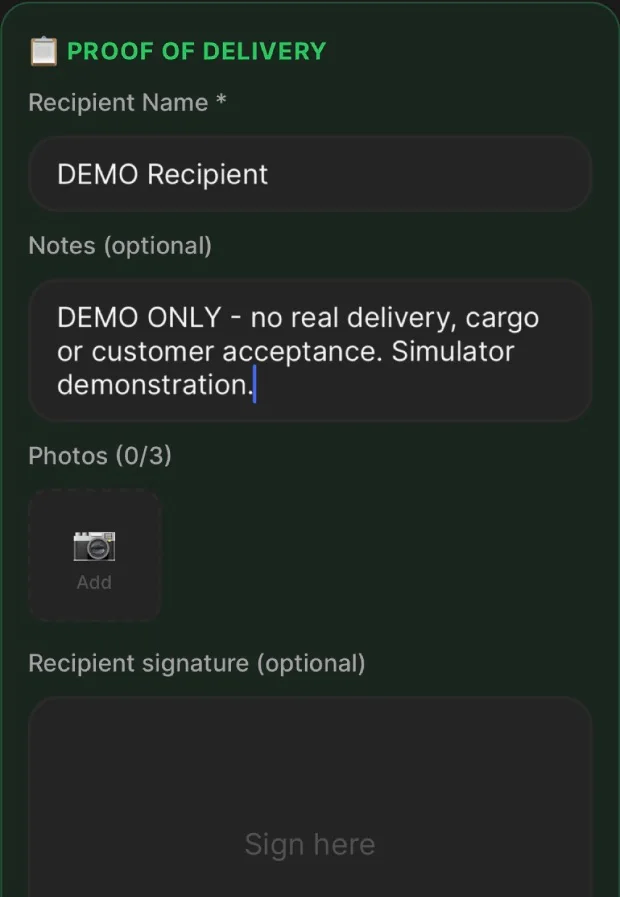
Capture proof of delivery
This test records a demonstration recipient and delivery notes. The form also offers photos and a signature; neither was supplied in this example.
STEP 10
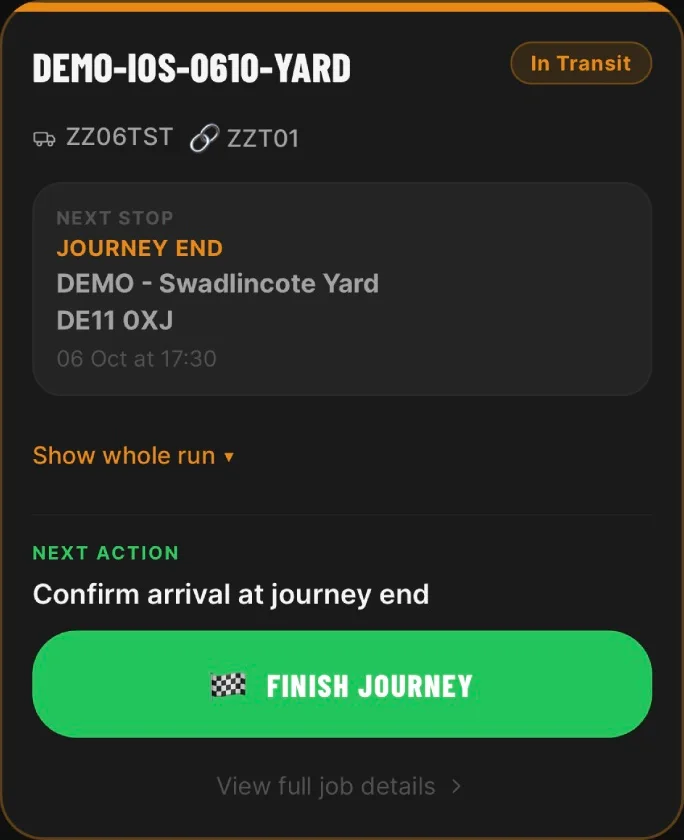
Return to the yard
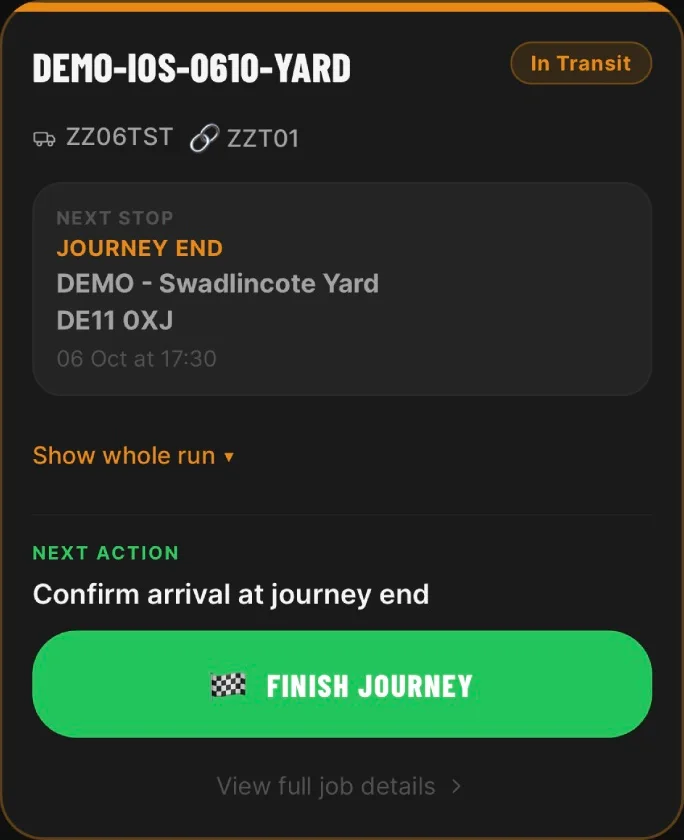
The final stop is the starting yard. The driver confirms arrival and completes the final stop to close the run.
Driver app questions
- What is a driver app for haulage companies?
- It is a mobile app drivers use to receive assigned jobs, complete daily walkaround checks, report defects, update job progress, capture proof of delivery and message the office. HauliK provides this as a mobile-first app connected to the transport office web dashboard.
- Do drivers need the mobile app, or can they use a web page?
- Driver workflows in HauliK are designed to be mobile-app-first. Drivers complete checks, update jobs and capture delivery evidence from the app on their phone, while the office uses the web dashboard.
- Does the driver app track drivers live?
- No. HauliK does not provide live driver tracking, telematics or live vehicle tracking. Location evidence is recorded against certain actions where available; it is not continuous tracking and is not attached to every action.
- Can drivers capture proof of delivery in the app?
- Yes, from the Fleet plan. Drivers can capture delivery status, recipient details, signatures and photos where required, and the evidence stays linked to the relevant job or delivery stop.
- How does the office see what drivers have done?
- Updates made in the driver app appear against the job in the office web dashboard. Transport teams can review job progress, check records, defect records and POD evidence from there.
- Is the HauliK Driver app available on iOS and Android?
- Yes. Drivers can use the HauliK Driver app on supported iPhone and Android devices for assigned jobs, checks, stop updates and proof of delivery.
One driver app for jobs, checks and proof of delivery
Start a free 14-day trial, compare plans, or request a guided demo. The driver app is included from Fleet, subject to the driver allowance shown on the pricing page, with no credit card and no fixed contract.